Prepare your Data for JADBio
If you have a dataset that you want to analyse and retrieve useful insights you can upload it to JADBio and generate a predictive model. Typical prediction tasks are (but not limited to)
- Disease Status (Diagnosis)
- Disease Subtype
- Response to Treatment
- Phenotypic Trait
- Time to Event (Death, Metastasis, Relapse)
JADBio can handle any life-science data type for any of these tasks, that is, both clinical or preprocessed molecular data or combinations thereof.
Data types
- sequencing data measured through PCR, microarray or NGS technologies, like short amplicon data, typically used for studying the DNA structure (e.g. SNP identification, phylogenetics, etc)
- omic data (e.g. genomic, proteomic, etc.) typically used for learning how a biological system functions
- cytometry data
- images
- single cell protein data like flow and mass cytometry or RNAseq
JADBio can work with any data that are inserted in tabular format. It does not care if the features are amplicons, genes, proteins, etc or whether the samples are patients or single cells. It can handle datasets with feature sizes, up to 1M and sample sizes, from 15 to 200K. There are also new algorithms that scale up to millions of samples/variables that we plan to include in one of our future platform releases.
Note
Currently, JADBio performs only basic data preprocessing; that is, data normalization/standardization, constant variable removal and missing value imputation. No other type of data preprocessing is possible through the GUI such as batch effect removal, data transformations (i.e. log, voom, M values, etc) or others.
Data Layout
JADBio expects datasets as a 2D matrix with the rows corresponding to samples, the columns corresponding to features (a.k.a. biomarkers, variables, measured quantities) and a defined Outcome of interest (target/dependent feature).
Note
JADBio can handle multi-class, regression and survival Outcomes beyond the binary ones.
The dataset can be in any delimited text file format (comma, colon, semicolon, vertical line, space) and values may be quoted. If your file doesn't include feature or sample names, JADBio will create them. Also, JADBio expects samples to be organized in rows. If your data has samples in columns, JADBio can transpose your uploaded data to match the JADBio convention.
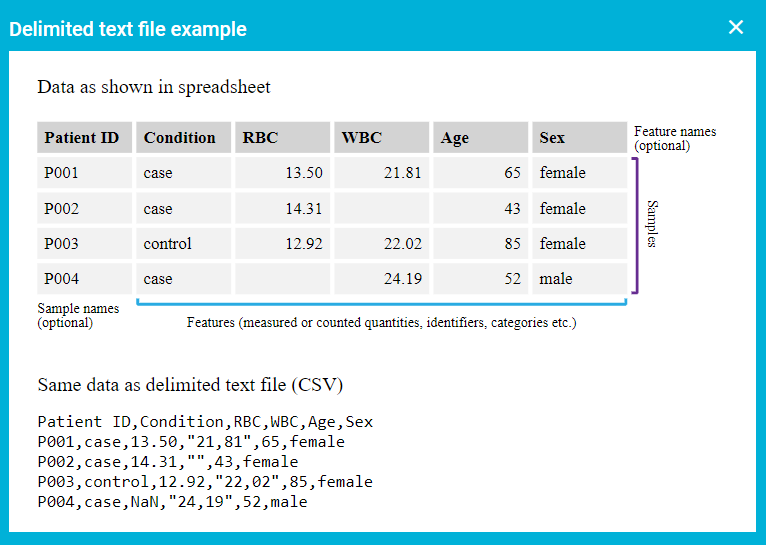
JADBio's dataset convention
Feature types
Given your 2D matrix of data, JADBio will automatically assign a feature type based on content of each column. This is essential because depending on the feature type a different machine learning task will be performed if this feature is selected as outcome. For example, if the type of the feature selected as outcome is categorical with two categories, a binary classification model will be generated. Accordingly, if the type is numerical a regression model will be sought by JADBio.
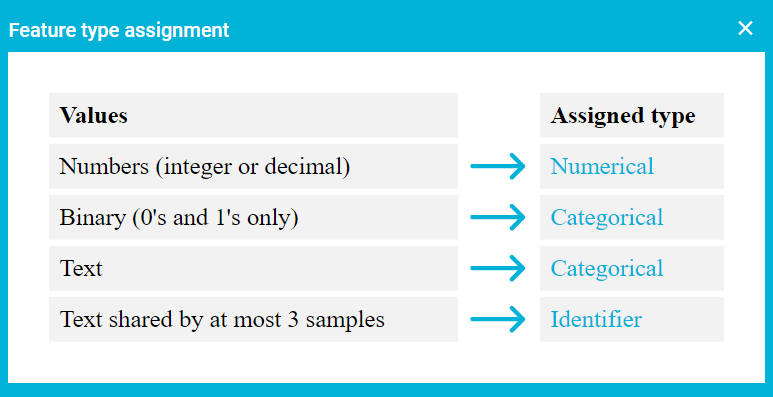
Feature type assignment by JADBio
Editing feature types
Before finalizing the addition of a dataset to your project you will be asked to review the data and change the assigned feature types if needed. Later on, if you need to change a feature type you can do a transformation that suits your understanding of your data.
Numerical
Numerical feature types refer to features/variables that are quantitative and can be compared by their measured value. Numerical types can be continuous, e.g. weight, glucose concentration levels, or discrete, e.g. days elapsed, mRNA counts.
Categorical
Categorical features refer to features/variables that are qualitative and are used to distinguish among specific states a variable can have, called classes. Examples of categorical features are smoking status (binary), or cell type (multiclass).
Event
An event feature type is a binary, categorical feature that encodes the 2 states of an event, i.e. already happened, or not happened yet. This is a special feature type used in Survival analysis, where the event can be death from a cause under examination, or that a component stopped working. If you want to perform Survival analysis, JADBio interprets the event value "1" to mean that the sample experienced the event at a specified time.
Time to Event
A Time-to-Event feature type is a special numerical feature type used in Survival analysis and tied to the aforementioned Event feature type. It quantifies the time elapsed for a specified event to occur.
Identifier
An identifier feature is a special type of feature that will not be considered during the analysis, i.e. in Feature Selection nor in Modelling. It can be used for defining clustered data.
Clustered Data
Clustered data can be defined as “data that can be classified into a number of distinct groups or clusters within a
particular study". Clustered data violate the most common assumption made by most learning algorithms: that samples are
identically and independently distributed (i.i.d. data). Examples of clustered data in bioinformatics include matched
case-control data, genetic studies including same family members, and repeated measurements on the same subject.
You can choose an Identifier feature to be used as a cluster variable in order to split samples accordingly during
cross validation, i.e. samples belonging to the same group will either be in the training set, or in the test set.
This technique is used to handle the bias introduced by possible batch effects, i.e. correlation among samples.
Missing Data
Missing values can be encoded as empty cell, null, na, n/a, nan and ? including all case variants. Cells with missing values will be imputed based on feature's distribution during the preprocessing step of the analysis.
Caution
Missing values are not allowed on the feature that acts as the Outcome variable.
Note of appreciation to JADBio users
We constantly make changes in the software and do our best to update these materials, but you may notice some differences. We welcome your feedback on how to make this more useful for you and requests for future tutorials.